
AtiNAMatiC — One Knob Series
23 single-knob plug-ins: Boost, Dirt, Gate, Air, Tight and more
Free · no account or sign-up required · open source
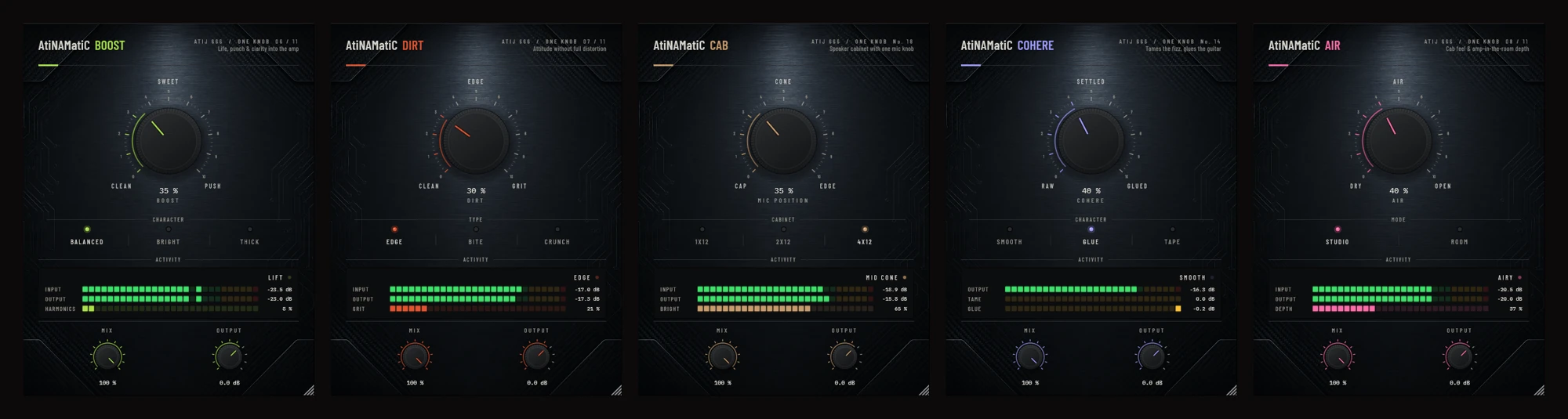
One knob. One job. Done.
The One Knob Series is a collection of focused plugins that each do one thing well, built for players who want to shape a tone fast without menu-diving.
Use them around your amp sim: boost the front end, tighten the low end, tame fizz, add room and width, and keep levels even.
What's inside
Boost
Front-end clean boost: life, punch and clarity before the amp sim.
Dirt
Harmonic saturation that adds grit and bite without muddying the low end.
Tight
Controls flub and mud in down-tuned and high-gain rigs.
Gate
An intelligent noise gate that silences hum and buzz between notes.
Cohere
Catches amp-sim fizz only when it sticks out, and glues the tone together.
Air
Post-cab amp-in-the-room feel: air, presence and stereo depth.
Double
A natural double-tracker that thickens a mono signal without chorus artefacts.
Room
Ducking room ambience that dips while you play and blooms in the gaps.
See it in action.
Tech specs.
- Type
- Single-knob effect plug-ins (no standalone apps)
- Formats
- VST3 · CLAP · LV2 on every platform · AU (macOS)
- Platforms
- Windows 10+ x64 · macOS 10.15+ (Universal) · Linux x86_64 · Linux ARM64
- Includes
- 23 plugins: Air, Bloom, Boost, Cab, Choke, Cohere, Dirt, Double, Feel, Gate, HitZone, Hum, Level, Mono, Pick, Pitch, Reach, Room, Sag, Slow, Squash, Strum, Tight
- Installers
- Windows Setup.exe and macOS .pkg: tick the plug-ins and formats you want · Linux: install script that asks
- Single downloads
- One zip per plug-in per platform, with every format and its manual
- License
- Free and open source (GNU GPL v3), source on GitHub
Installing, step by step.
These are free builds from an independent developer, so they aren't code-signed by Microsoft or Apple. The first time you open them, your computer may warn you. That's expected, and the steps below show what to click.
Windows 10/11
- Download the All plug-ins installer and run
ONE-KNOB-Series-v1.0.0-Windows-x64-Setup.exe. - If you see "Windows protected your PC", click More info, then Run anyway.
- Tick the plug-ins and formats you want (VST3, CLAP, LV2), untick the rest, and finish.
- Rescan plug-ins in your DAW.
Just one plug-in? Unzip it and copy the .vst3, .clap and .lv2 into C:\Program Files\Common Files\ (folders VST3, CLAP, LV2).
macOS 10.15+
- Download the All plug-ins installer (
.pkg). - If macOS won't open it, right-click it and choose Open (or go to System Settings › Privacy & Security and click Open Anyway).
- Click Customize and tick the plug-ins and formats you want (VST3, AU, CLAP, LV2).
- Rescan plug-ins in your DAW. Logic and GarageBand use the AU versions.
Just one plug-in? Copy its files into /Library/Audio/Plug-Ins/ (VST3, Components, CLAP, LV2), then run xattr -cr on each, e.g. xattr -cr /Library/Audio/Plug-Ins/VST3/AtiNAMatiC-Boost.vst3.
Linux (x86_64 / ARM64)
- Download the All plug-ins archive for your machine and extract it.
- In that folder, run
./install.sh. It asks which plug-ins and formats to install. - Rescan plug-ins in your DAW.
./install.sh --all installs everything, --system installs for all users, --uninstall removes them. Single zips go into ~/.vst3, ~/.clap and ~/.lv2.
Every plug-in's manual is inside its zip, and the full ONE KNOB Series manual (PDF) is in the download window.
Get AtiNAMatiC — One Knob Series.
Free to download. No account, no sign-up — just click and install.