
Neural Stage
Live guitar rig host built around NAM amp models
Free · no account or sign-up required
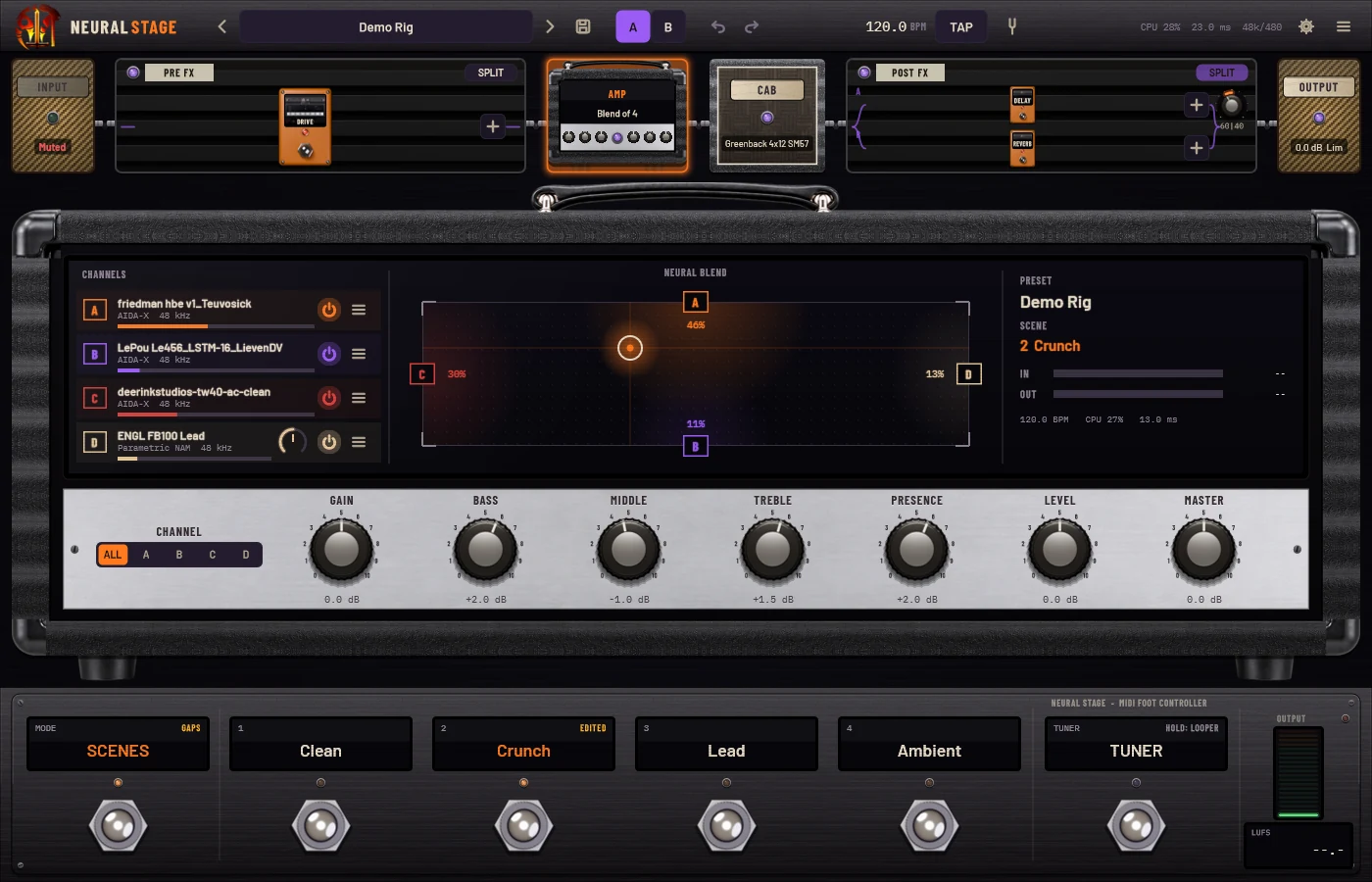
Four amps. One blend. Your whole rig on stage.
Neural Stage is a live guitar rig built around neural amp captures. Load up to four NAM models into the amp's blend screen and drag one point to morph between them, with constant loudness and no phasing.
Put your own plugins before and after the amp, add the built-in dual-IR cab, and play the night from a gig view with big footswitch tiles and gapless scene switching. It runs standalone or inside your DAW.
What's inside
4-model neural blend
Four captures at once on an XY blend screen. Constant-loudness, latency-aligned blending, with tone controls on a chrome amp faceplate.
Your plugins around the amp
Host VST3, CLAP, LV2 and AU plugins before and after the amp. Split any section into two parallel lanes, latency-aligned with an A/B mix.
Built-in cab
Two IR slots with level and pan, plus mix and low/high cut. IRs at any sample rate are resampled and level-matched.
Made for the gig
Presets, stomp and scene modes on big footswitch tiles. Scenes that share models switch gaplessly; the rest duck, load and fade back in.
Safe, consistent output
Raw, Normalized or Calibrated output modes, a look-ahead limiter that never clips, and LUFS and true-peak metering.
Practice tools included
Tuner, 60-second looper with overdub and count-in, a backing-track player, noise gate, pitch shift and doubler.
MIDI everywhere
MIDI learn on every knob, a footswitch wizard, program changes for scenes, and MIDI clock out.
Runs on small screens
Scales down to 800×480 touchscreens, so it can run a dedicated Raspberry Pi 5 rig.
See it in action.
Tech specs.
- Type
- Live rig host and amp modeler
- Formats
- Standalone · VST3 · CLAP
- Platforms
- Windows 10/11 x64 · macOS 11+ (Universal) · Linux x86_64 · Linux ARM64 (Raspberry Pi 5)
- Amp models
- NAM (A1 and A2) · Parametric NAM · AIDA-X · GuitarML
- Hosts plugins
- VST3 · CLAP · LV2 · AU (macOS)
- Audio
- ASIO, WASAPI, DirectSound · CoreAudio · ALSA, JACK, PipeWire
- Rig files
- .nsrig packages with models and IRs included
Installing, step by step.
These are free builds from an independent developer, so they aren't code-signed by Microsoft or Apple. The first time you open them, your computer may warn you. That's expected, and the steps below show what to click.
Windows 10/11
- Download the Installer, unzip it and run
NeuralStage-0.3.0-Setup.exe. - If you see "Windows protected your PC", click More info, then Run anyway.
- Follow the installer, then rescan plug-ins in your DAW to use the VST3 or CLAP version.
No installer? The Manual install zip has NeuralStage.exe, NeuralStage.vst3 (copy to C:\Program Files\Common Files\VST3) and NeuralStage.clap (copy to C:\Program Files\Common Files\CLAP).
macOS 11+
- Download the Standalone or VST3 zip and double-click it to unzip.
- Drag
NeuralStage.appto Applications, or copyNeuralStage.vst3to/Library/Audio/Plug-Ins/VST3. - First launch: right-click the app, choose Open, then Open again. After that it opens normally.
If macOS says the app is damaged or still won't open, run xattr -cr /Applications/NeuralStage.app in Terminal (or the same on the .vst3).
Linux (x86_64 / ARM64)
- Download the AppImage zip for your machine and unzip it.
- Make it runnable:
chmod +x NeuralStage-*.AppImage. - Double-click it or run
./NeuralStage-*.AppImage.
For your DAW, copy NeuralStage.vst3 from the VST3 zip to ~/.vst3. Raspberry Pi 5: use the ARM64 files.
The full guide is in the user manual (PDF), also in the download window.