
AtiNAMatiC Tone
Full guitar amp simulator with a 32-slot effect grid
Free · no account or sign-up required
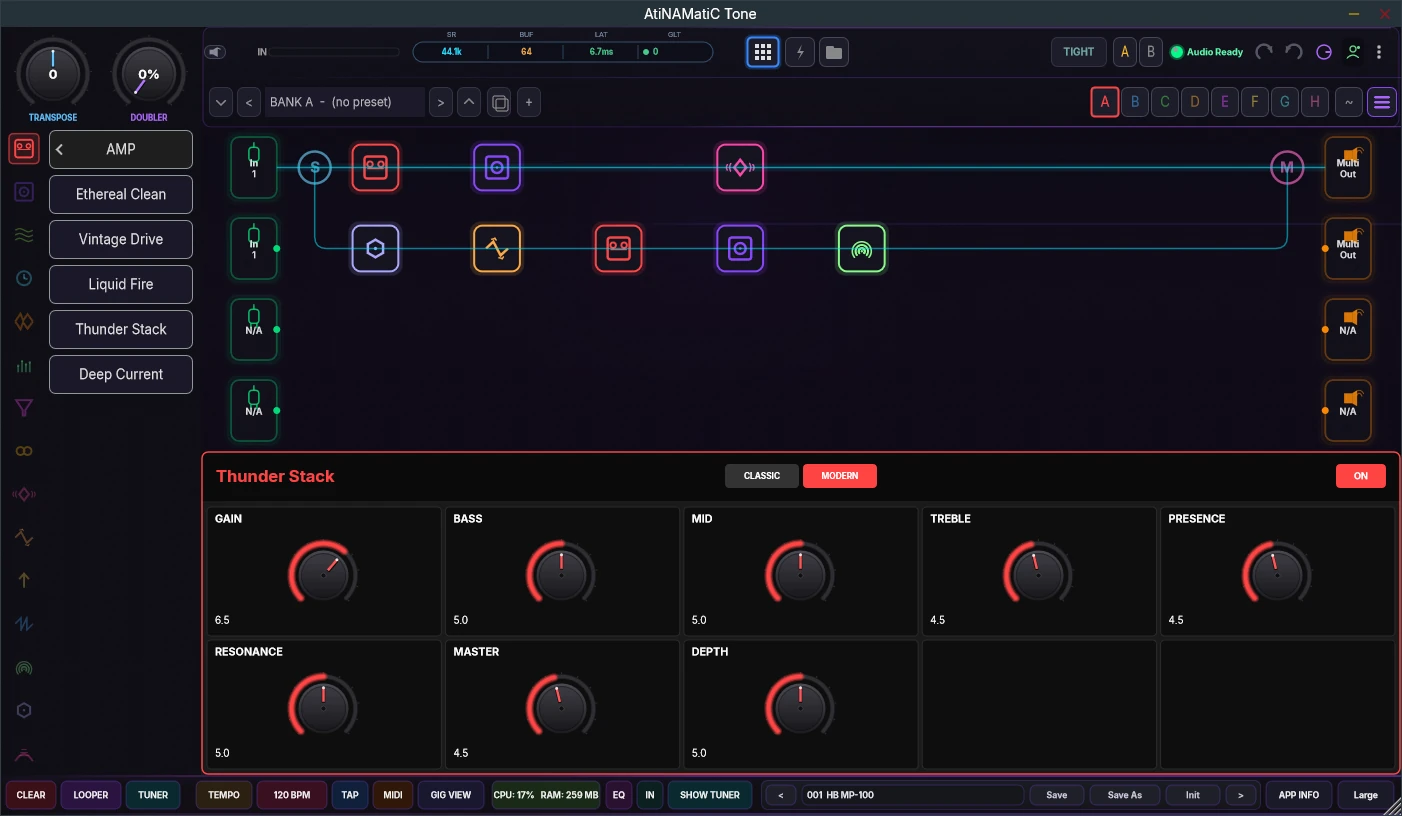
A full guitar rig on a 32-slot grid.
AtiNAMatiC Tone is a complete amp and effects processor. Load any NAM capture, stack two models, and build your rig on a 32-slot grid with serial and parallel routing.
Over 40 DSP blocks cover amps, cabs, drives, compressors, modulation, delays, reverbs, EQs, filters, pitch and wah, with a looper, tuner and tap tempo built in.
What's inside
Neural Amp Modeler inside
Load any .nam capture, with dual-model A1/A2 stacking and a built-in NAM browser to audition captures.
32-slot effect grid
Four rows of eight effect slots, each row with its own input and output. Route them in series or parallel, from a simple pedalboard to a stereo wet/dry rig.
40+ DSP blocks
Amps, cabs, overdrives, compressors, modulation, reverb, delay, EQ, filters, pitch, wah and more.
Authentic tape delay
A multi-part wow and flutter model with drifting, non-repeating modulation, like a real tape machine.
Stereo cab IRs and pro EQ
Stereo WAV IRs map left and right to two mic positions. Shape the result with an 8-band parametric EQ and a global EQ.
Ready to play
64 factory presets across 8 banks, MIDI learn on any knob, a looper, tuner and tap tempo.
See it in action.
Tech specs.
- Type
- Amp simulator and multi-effects
- Formats
- Standalone · VST3 · CLAP · LV2 · AU (macOS)
- Platforms
- Windows 10/11 x64 · macOS (Universal) · Linux x86_64 · Linux ARM64
- Stem splitter
- AI stem splitting in the looper (Windows)
- Amp models
- NAM .nam captures, with dual A1/A2 stacking
- Effects
- 40+ DSP blocks on a 32-slot grid (4 rows × 8 slots)
- Cabinets
- Mono and stereo WAV impulse responses
- Presets
- 64 factory presets in 8 banks
Installing, step by step.
These are free builds from an independent developer, so they aren't code-signed by Microsoft or Apple. The first time you open them, your computer may warn you. That's expected, and the steps below show what to click.
Windows 10/11
- Download the Installer and run
AtiNAMatiC-Tone-v1.2.7-Windows-x64-Setup.exe. - If you see "Windows protected your PC", click More info, then Run anyway.
- Tick the plug-in formats you want (VST3, CLAP, LV2) and finish. The app is always installed.
- Rescan plug-ins in your DAW.
The installer includes the AI stem splitter for the looper, the built-in captures and IRs, and the Microsoft Visual C++ runtime if it's missing.
macOS
- Download the Installer (
.pkg). - If macOS won't open it, right-click it and choose Open (or go to System Settings › Privacy & Security and click Open Anyway).
- Click Customize and tick what you want: the app, VST3, AU, CLAP, LV2.
- Rescan plug-ins in your DAW. Logic and GarageBand use the AU version.
The built-in captures and IRs install to /Library/Application Support/AtiNAMatiC Tone, where the app and plug-ins find them.
Linux (x86_64 / ARM64)
- Download the archive for your machine and extract it.
- In that folder, run
./install.sh. It installs the app and asks which plug-in formats you want. - Start it with
atinamatic-toneor from your applications menu, and rescan plug-ins in your DAW.
./install.sh --all installs everything, --system installs for all users, --uninstall removes it. Raspberry Pi 5: use the ARM64 archive.
The full user manual (PDF) is in the download window and is installed with the app.
Get AtiNAMatiC Tone.
Free to download. No account, no sign-up — just click and install.